
Most of the past weekend went into the Pages feature introduced in version 1.6.0. The builder and its templates have had quite a rework.
A lot of this comes from feedback from my best friend. She has little to do with role-playing games, but still clicks through Atlavium and shows me where someone without my built-in knowledge gets stuck. I know every button by heart. That does not necessarily make me the best person to test a first visit. Thank you for those observations – bit by bit, they help everyone setting out with their Atlavium.
Changes to Pages and Profiles
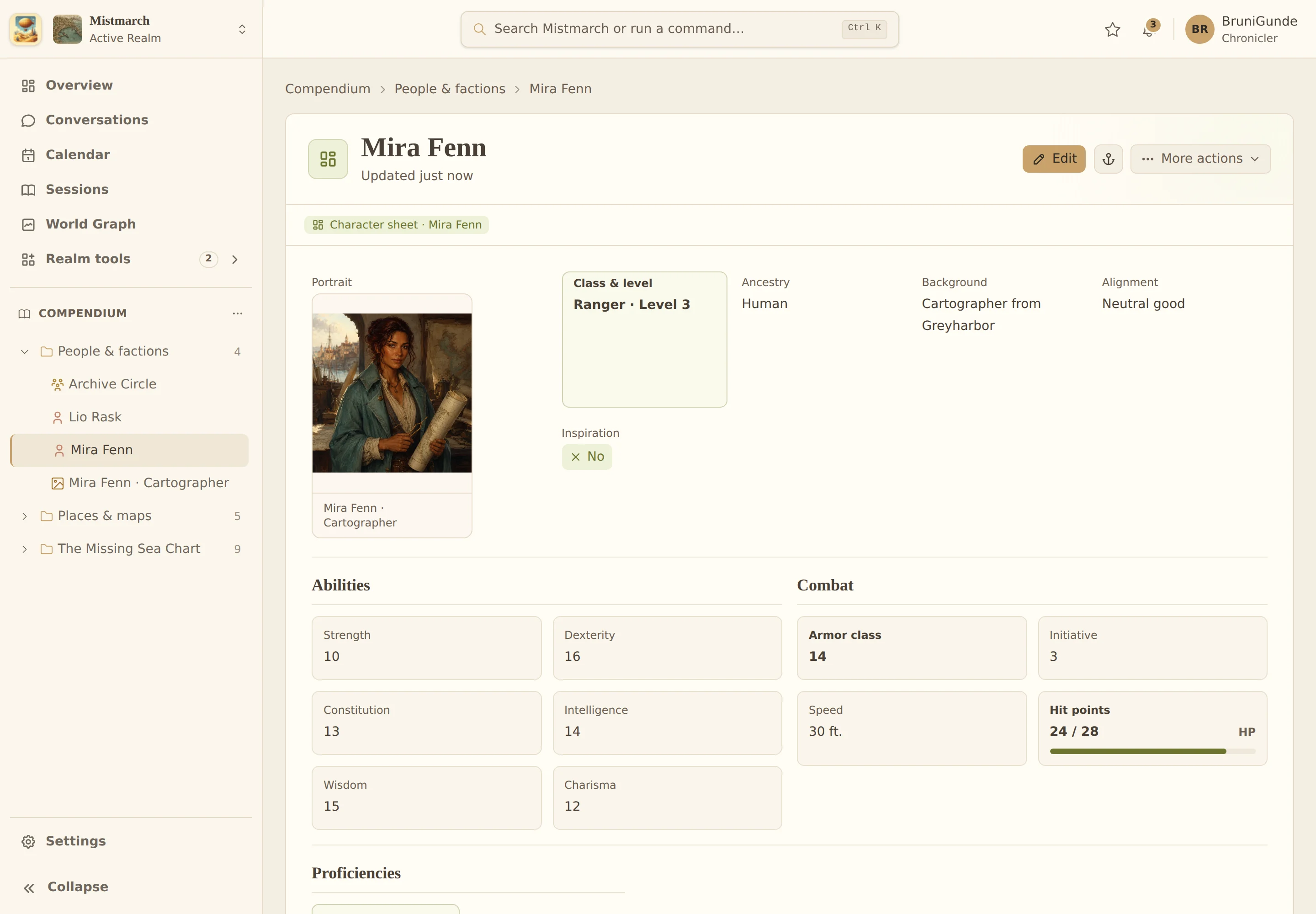
- More room to design: Fullscreen keeps the template, outline and properties beside each other. Arrange sections and fields in rows with different column splits. Undo and redo help when a rearrangement goes sideways.
- Design, fill, read: Try filling out the form directly in the builder, then switch to its reading view. You can design and check the screen view, compact preview and print layout separately. See the builder and its views on the feature page.
- Revised starter templates: New Realms start with character sheets and handouts that use clearer groups and make better use of space. You can develop templates in existing Realms further in the builder. Existing Pages and Profiles retain their template snapshot; a new instance uses the current version of the selected template.

Open the full-size character sheet
New
- Take your worlds with you: Compendium export lets you download your Realms as a ZIP with Markdown, JSON and stored media, ready to read outside Atlavium. The export specification is publicly available, including schemas and examples. Importing into Atlavium is planned as the next step.
- More screen space for your Realm: On desktop, collapse the Realm sidebar when you do not need the Compendium tree. Module icons remain available for navigation.
- The Keeper for everyone: Starting with this release, I’m providing every user with an allowance of 500 AI credits. You can use them for conversations with your Keeper, AI text tools and suggestions for Page content. Drop by Discord and tell me how you get along with the old librarian.
Fixes
- World Graph: Larger graphs load faster and need rebuilding less often as you navigate. Improved contrast makes their connections easier to see. If the graph view gets out of sync, Atlavium starts a repair automatically and shows you its status.
- Search: Global search and the Keeper’s research retrieve relevant content more efficiently, including structured Page content.
- References and sharing: Links from World Entities to Pages work more reliably, as does applying shared updates to Page sections.
- Images: Image variants that have already loaded can be reused in other views instead of being generated again each time.
What I’m thinking about next
For Pages, I want to refine validation and the available content types. One idea is to start with a character sheet, then create and connect the corresponding person World Entity and its image from there. That would let you begin with what you want to make. For now, it is an idea, not an existing workflow.
I’m also thinking further about Session support: preparation, recaps and comparing events with your Compendium. As always, the steps along the way will appear in the changelog. And if you want to show me what I have missed among all those familiar buttons, come and have a chat on Discord.