
With this version, the information in your world moves closer together. An image belongs to the place it shows. A person has a place in a family or an organization. And after a session, there is often not just a recap but also new knowledge about your world.
Three things have arrived for those connections: diagrams for chosen relationships, an image gallery on World Entities and session preparation and recap with the optional Keeper. The calendar gains several moons, multi-day events and an agenda.
Diagrams: the right view of a connection
The World Graph shows every recorded connection. That is the deep look into your whole Compendium, and sometimes it is simply too much. You want to document the 600-year history of an influential family? You want to show how a city council is organized and see which offices report where and who currently holds them? That calls for a deliberately chosen excerpt.
A diagram is its own content in the Compendium. When you create one, you choose between a family tree, an organization chart and a relationship network. Your World Entities and the relationships from the World Graph remain the foundation. A relationship entered once can appear in several diagrams; each diagram tells its own excerpt through its selection and arrangement. You can read more on the Diagrams page.

Open the full-size family tree
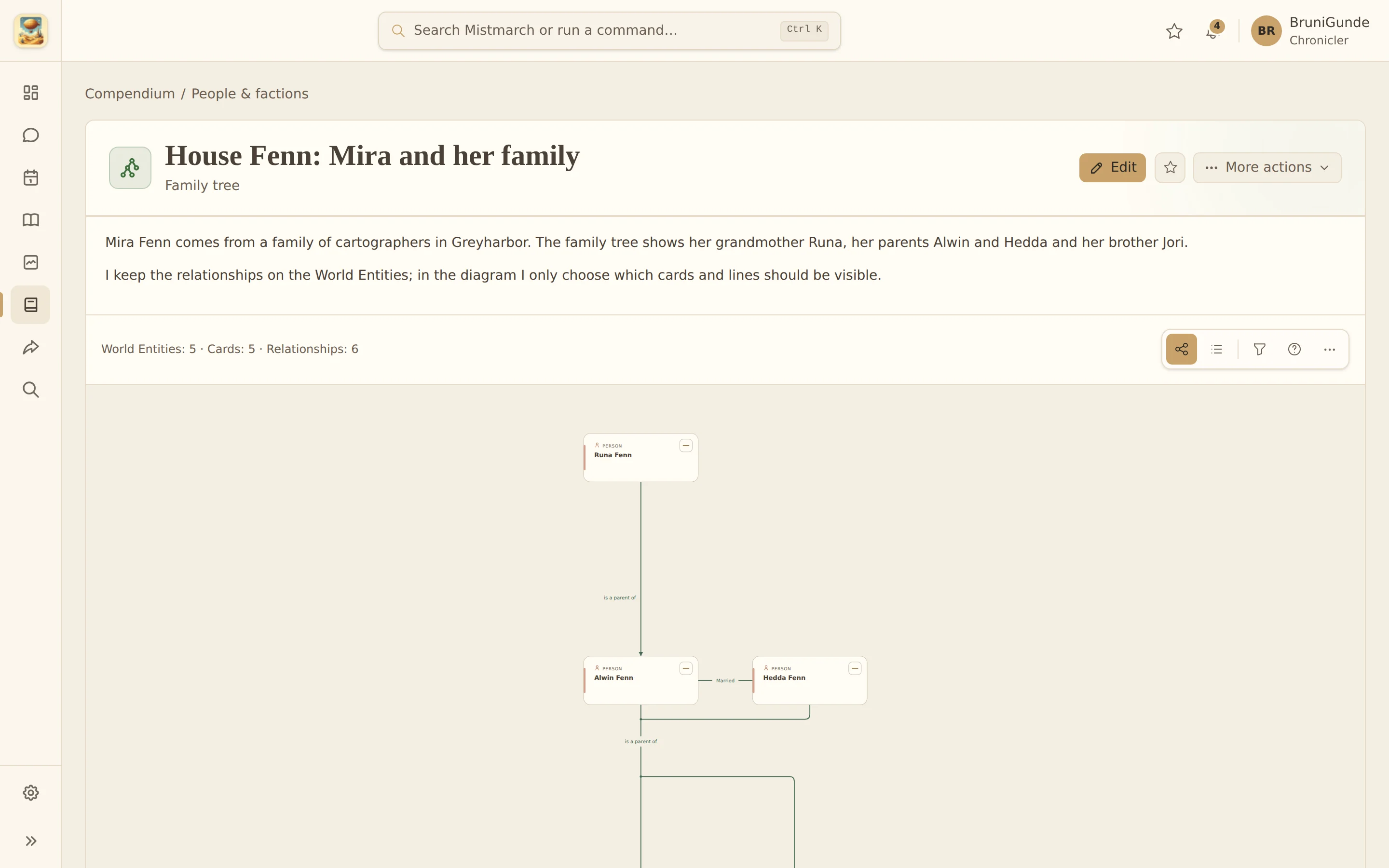
- Cards with Profile details: Add a portrait and selected fields from a Profile to a diagram card, such as a title or a short description. You decide which details appear on the board.
- Templates: Save your own templates for recurring patterns. Anyone building several family trees or organization charts with the same settings does not have to set them up again each time.
- Export: Diagrams can be exported as SVG, PNG or PDF. You choose which cards to include. A reduced export removes Profile and source details; portraits are controlled separately. An export does not make itself anonymous along the way.

Open the full-size organization chart
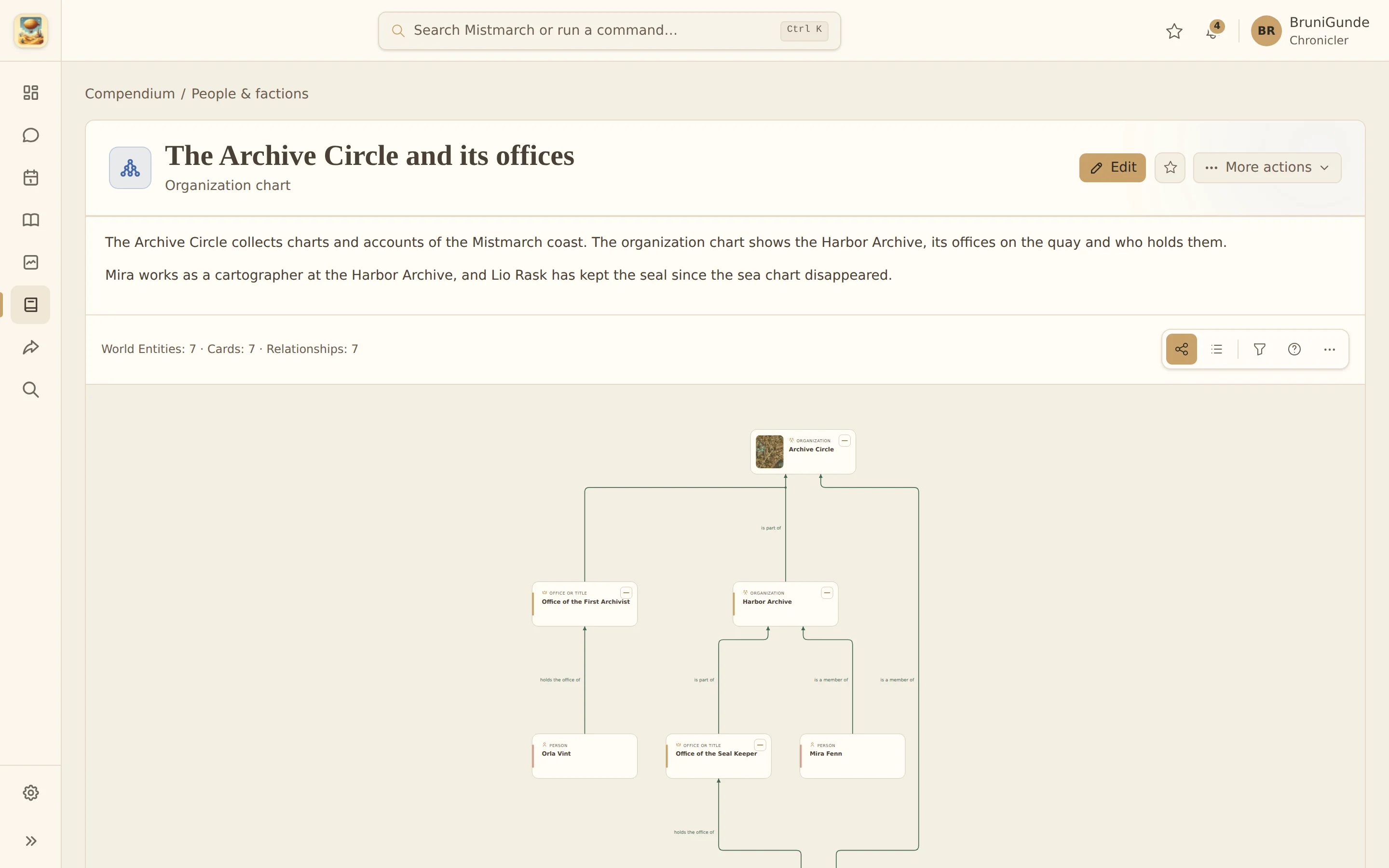
When you share through your Fellowship, a bundle is put together with the content it needs. That can include Profiles and gallery images of the World Entities involved. Profile fields you have not shared stay excluded. Still check what you select before sharing: a diagram should not become a back door to hidden details in your world.
More moons, longer events and an agenda
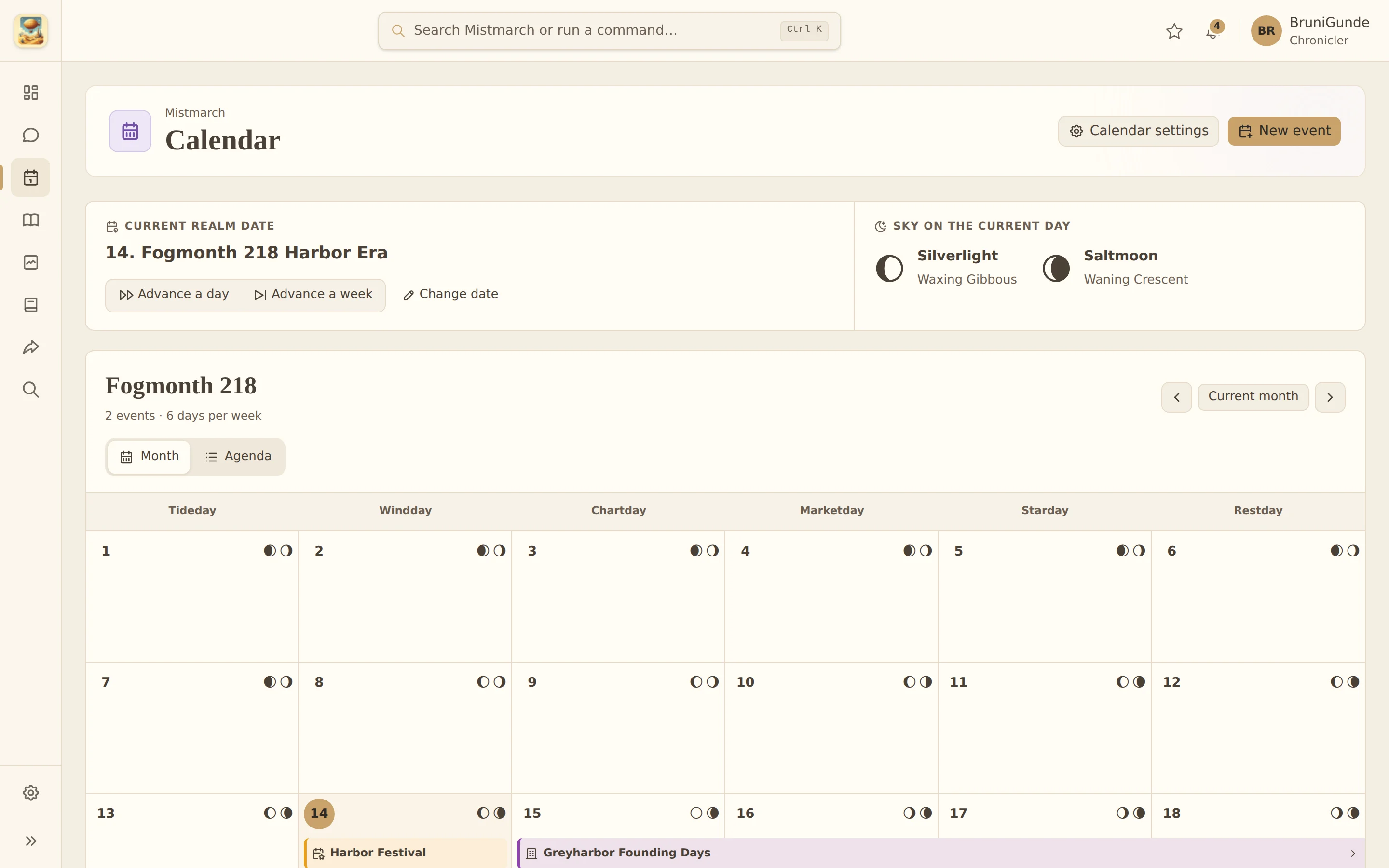
The calendar of your world does not have to stop at one moon. You can configure several moons with their own cycles. Their phases are calculated for every calendar day, and the day view shows you the details. The Realm Calendar page explains the setup.
Events can now run across several days as well. A journey, a siege or a multi-day festival gets a start and an end date and is shown as one connected period. The new agenda adds a list to the month view: you only see the days that actually have something planned or recorded. The month view itself has become a little tidier along the way, including for leap days.

Session recaps with the Keeper
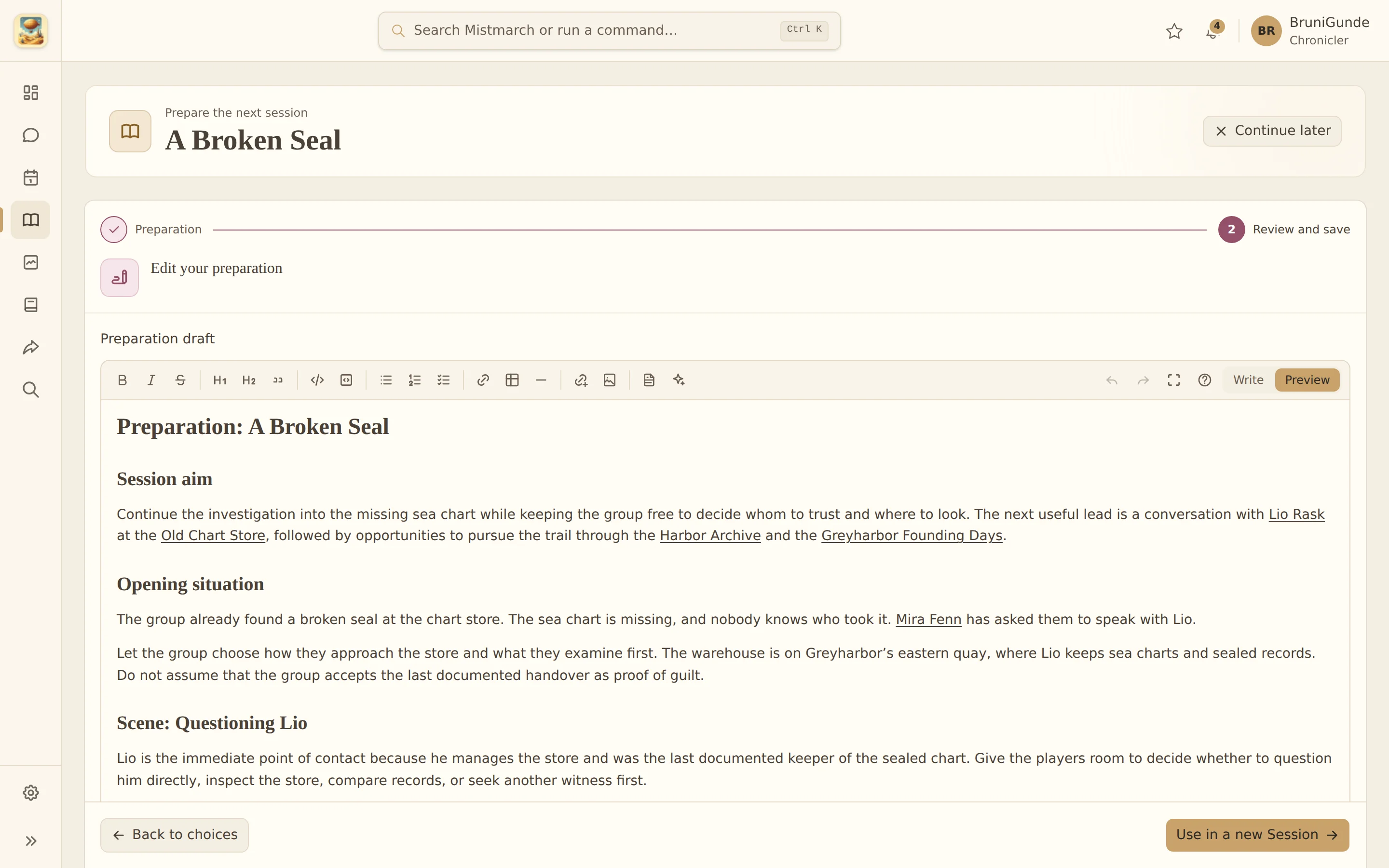
Handwritten notes, an audio note, a few digital documents: put your material into the recap assistant and let it shape a review. But be careful, even the Keeper cannot read every handwriting. My own handwriting is hard for him to decipher. I also tend to fill the margins with notes about new world knowledge, and then the Keeper struggles to work out what I meant. I have learned from that: I can speed up the recap a lot when I structure my notes better. Two years later, I can hardly decipher my own margin notes either. I am a bit of a chaotic fellow.
An audio note on the next day is enough as a basis. You simply speak your thoughts, a transcript is made, and the Keeper uses it for your session notes. You do not have to record the session itself to benefit from audio. I also like to hand in the journal I keep for my character anyway; that works much better than my handwriting. Some margin notes get lost that way, but they usually concern things I still want to add to my Atlavium. What were those Peacekeepers called again? Sometimes my character gains world knowledge that does not belong in the recap but in the world.
You review the material first and the proposal afterwards. Even a well-written recap can carry over a passage that was misread. New world knowledge does not become Canon just because a suggestion mentions it. For the first proposal, the Keeper can include the reviewed content of the files you added; once you confirm the recap, those originals are removed. Uploads have size and count limits, and audio processing uses its own minutes allowance. All of it remains an extra hand: you can still document your session entirely by hand if you prefer.

Open the full-size session recap
New
- Images with their World Entities: Link existing images to a place, a person or another World Entity. You can upload new images right there, without changing context. That way the page for your harbor district shows the pictures that belong with it.
- Add content from the form you are in: Many dialogs now offer a small "New" button beside a selection. Folders, categories, types, images and World Entities can be created without leaving the half-filled form. Drafts catch you if you do have to cancel.
Changes
- A tidier calendar: Month view and agenda follow your calendar configuration. On small screens, the actions for moving through time and creating an event stay visible and labelled.
- Continuing sessions more clearly: The overview points out the next sensible step for planned, past and already documented sessions. Open files or world suggestions lead to their review; a saved recap no longer receives a second link to the same target.
- Narrowing search results: An adjustable minimum relevance controls which results the search shows. With any luck, fewer unrelated entries end up in your list.
- Printing entities in full: Printing a World Entity now includes gallery images, facts and world events. Pages remain separate print content.
- Clearer usage: The Keeper usage on the Realm overview now names the individual purposes more precisely.
Fixes
- Calendar: A missing start month now produces a field message when you create or edit an event, and the rest of your input is kept. World dates without a Realm calendar now explain why no in-game date can be chosen. Leap days are separated more clearly from the regular grid in the month view.
- Sessions: Invalid input receives focus, over-long material is explained as such, and the mobile steps stay compact. Real-world dates follow the chosen interface language.
- Diagrams: Your existing selection stays visible while you arrange the board. A card search without matches gets its own notice and can be reset directly.
- Readability and navigation: Links and text actions in prose, drafts, world connections and quick search are easier to read in the light theme. Long selection values and their "New" actions fit the available width on small screens. Entries with the same name stay independently selectable.
- Folders via "New": Newly created folders are confirmed and selected correctly in the main Compendium directory; subfolders adopt the chosen parent folder.
One personal note to close: this release took longer than the previous ones because the calendar, sessions and diagrams reach deep into the existing data. All the more do I look forward to your feedback. If something is missing or catches your eye, come and have a chat with me on Discord.