
Version 1.3.0 is mostly about two things that keep coming up at the table: reliability and recurring work. With tasks the Keeper gets fixed steps to follow, Markdown templates take the endless retyping off your hands, and the Notification Center is back so nothing slips past you anymore. On top of that come signing in with Discord and a first peek at something that still needs a while to grow in the background.
Added
- The Notification Center is back: One-time notifications did not go over well, because they disappeared too quickly. Now every notification sticks around for three months, and you can trigger fitting actions right from it.
- Weekly summary by email: Once a week you get an overview of your unread notifications by email. A small reminder of everything still open, in case you do not check every day whether shared content has updated. You can switch this off anytime in your profile.
- Sign-in and registration through Discord: You can link your profile with a Discord account and sign in with it. Registration now runs through Discord too. You connect or disconnect it in your profile, and then you do not need a password anymore.
- Keeper tasks: The Keeper now works through recurring jobs along a checklist, instead of guessing every time what you expect from it.
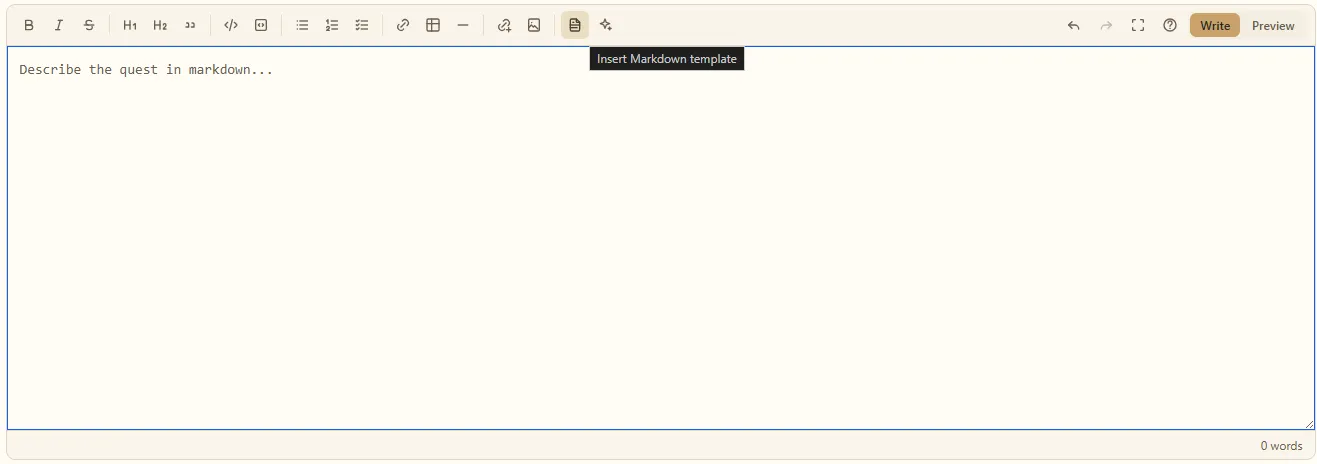
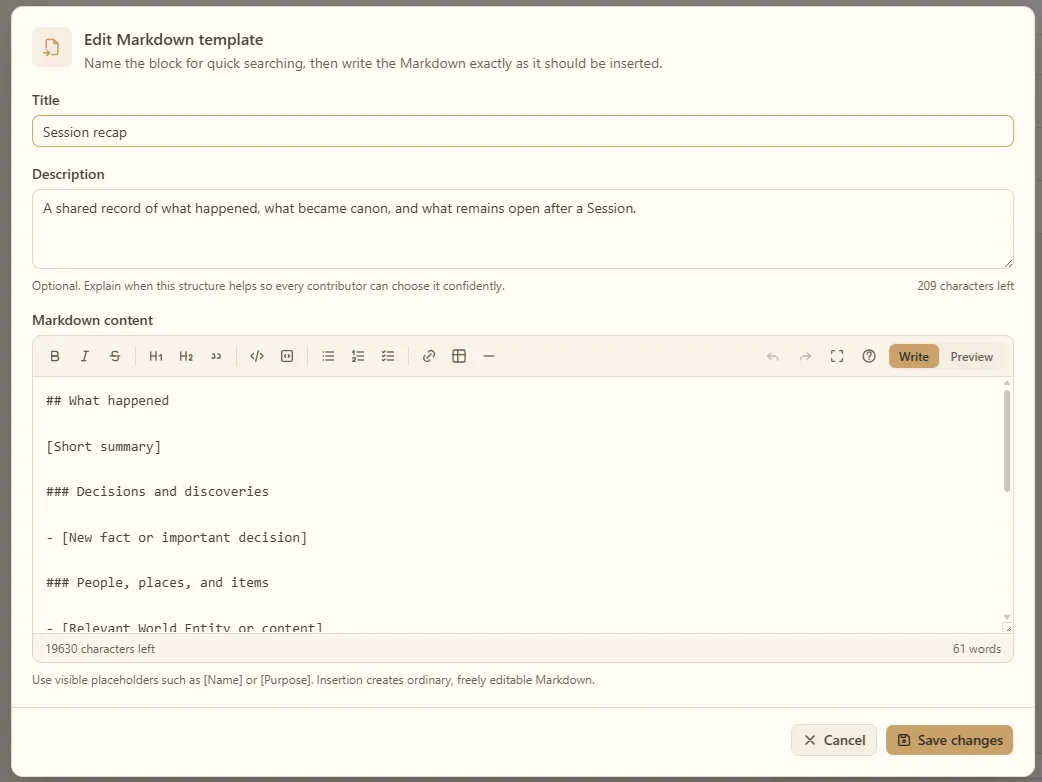
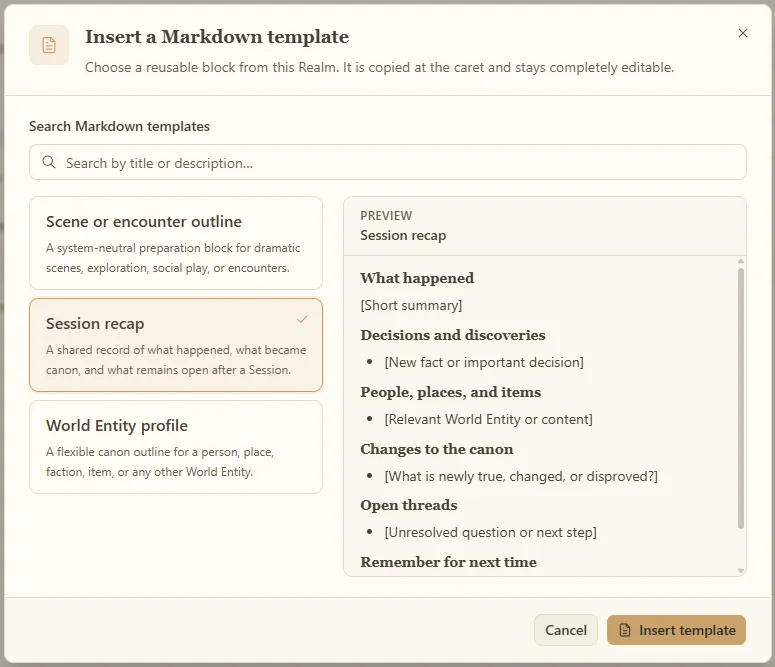
- Markdown templates: In a Realm's settings you set up recurring patterns once and start new pages from a template, instead of typing everything again.
Changed
- Edit folders from the open view: In the Compendium you can now delete or move a folder while you have it open. Before that you had to switch to the parent folder to do it.
Keeper tasks: the librarian's checklists
Did your librarian look a bit confused in the past when he was supposed to get something done for you? That comes down to how the Keeper works under the hood. Put simply, the AI tries to guess statistically from your input which plan you expect from it. Every answer is based on complex probability, and there is barely a way around that. That is exactly why answers always differ a little, and why the same request can lead to different searches and sources in your content.
So how do you solve that? A tidy old librarian of course has the order of his library, your Compendium, on his mind. So I introduced a system that lets me teach him fixed steps for certain jobs. For cases, that is, where I know beforehand which kind of content is likely relevant.
An example: I always had trouble using the Keeper to prepare the next session the way I would do it myself. Normally I take my notes from the last session, think again about what happened, and then about what might happen in the next one, what my character makes of it and what he thinks about it. On top of that I pull in the diary I have filled with plenty of fluff anyway. Out of that comes a rough plan for the next session, with ideas for which conversations and actions might come up.
Especially when that short, awkward silence hits my group, my character is pretty much predestined to bring up something on his mind again, or to simply ask a dumb question that steps hard on someone's toes. I am decent at that on the spot, but after one to three months I just do not remember every detail anymore. So I like to prepare it. For exactly those quiet moments.
To test the system I taught the Keeper which steps to take for preparing a session, to write a plan. Not with my very personal preferences of course, but in general and based on the last session. Whatever formats or special things you want, you can still just hand over in your question.
Instead of guessing, the Keeper now knows which activities it has to do for the goal. Here is what that looks like in a conversation:

Because the whole thing follows a fixed, programmatic flow, there is no dedicated interface for it right now. But if you have recurring routines where you wish that roughly the same thing happens every time, feel free to reach out on Discord. Let us talk about which checklists (I simply called them "tasks") we can hand the Keeper, so we all get a bit more reliability out of it.
I am looking forward to preparing more of these lists together with you, and I will surely bring in one or two ideas from my own game nights as well.
Markdown templates
In your Realm's settings you set up recurring page patterns. By default you get a "Session Recap", for example, that you can drop into every session again and again. Or you keep using certain lists and tables and do not want to memorize the layout or look it up every time. Then you put it into a template and add it to your pages whenever you need it. These can be small snippets too.
I hope this makes recurring work a bit easier. Templates can also contain
placeholders. A placeholder has the form [Placeholder]. After inserting a
template you step through the individual placeholders with the keyboard (Tab =
next, Shift + Tab = back) and fill in the right content pretty quickly. Once a
placeholder has been replaced, it is no longer part of that order.
Something is happening in the background
This version also quietly contains groundwork so that your Keeper, your librarian, can move into your home one day. You already have an AI running? Copilot, Claude, Codex, ChatGPT, and whatever they are all called? Then it might be nicer if you access your Compendium from the outside, the way you imagine it.
These tools usually allow a connection to external applications. That is exactly what I am working on: through the Model Context Protocol (MCP for short) you will get direct access to your data in a somewhat simplified, stripped-down version.
Of course you then miss some of the Keeper's comforts like long conversations, tuned prompts, or coordinated system flows. In return you build the access as freely as you like, with the tooling of your choice. This is mostly meant to create transparency: I mean it seriously with "Your content is and stays your content". It is a first step toward making your content accessible for you outside of Chronicle Keeper too. But it may still take a while, because the protocol has its stumbling blocks. Keep your eyes open!